
Company Reveal
All About Our Company Reveal Feature
What It's All About
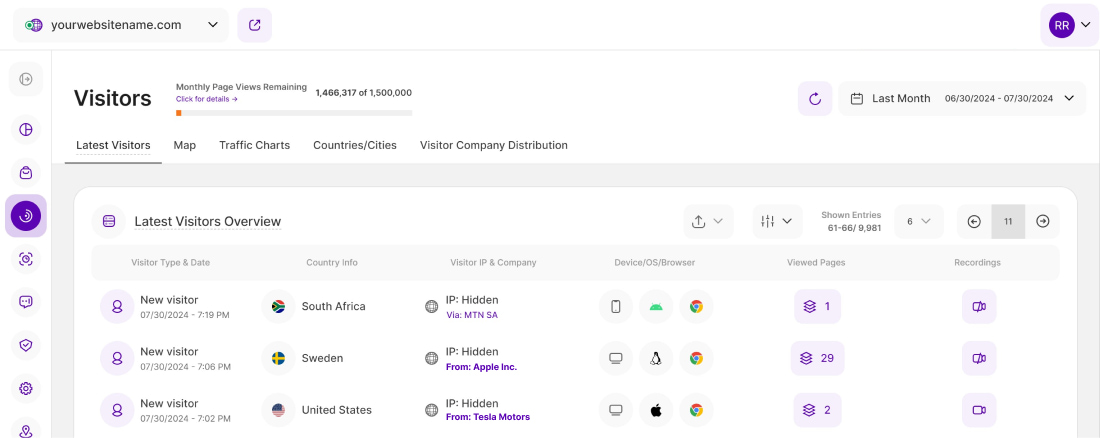
Website owners now have a powerful tool at their disposal - the Company Reveal feature. This functionality allows you to gain deeper insights into your website visitors, specifically discovering which companies have been visiting your website through their business network providers. By leveraging this feature, you can learn valuable information to improve Account-Based Marketing (ABM) initiatives, refine Ideal Customer Profile (ICP) development, and convert visits into pipelines.
Traditionally, website analytics have been limited to basic metrics like page views, bounce rates, and click-through rates. However, this feature takes website analytics to a whole new level by providing more detailed information about the companies or carrier networks from which visitors are accessing your website.
The information about the Company Names or Carrier Networks can be found in the following tiles which refer to Visitors:
- Main Dashboard > Latest Visitors
- Web Statistics > Visitors > Latest Visitors
- Web Statistics > Visitors > Visitor Company Distribution
Important Notes: The accessibility to information would depend on the selected Data Privacy Mode. Check your settings within the data privacy center for more details.
Set the Date
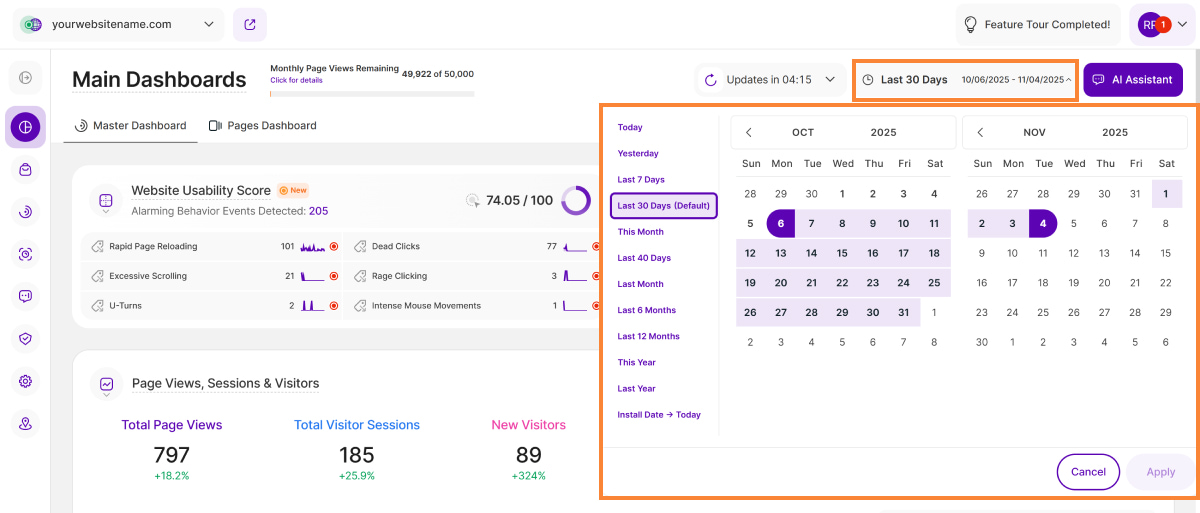
Right above the tiles, you can see a date picker. This enables you to select a certain time period, or specific day, for which you want the Dashboard's data to correspond. It's important to use these constraints to select periods during which you ran campaigns or conducted other actions, so as to better analyze the impact of such activities.
You also have the possibility to set the dashboard's data to auto-reload every few seconds/minutes depending on your needs.
Important Note: The app now remembers previously set segments, filters, filter templates, and date intervals, even when you navigate away from the page, log out, or log back in. When your session expires or you close the tab, it automatically switches back to the default setting of "Last 30 Days."
Some General Hints
- To use this feature, a minimum pricing plan must be purchased. If you are not subscribed to the required minimum pricing plan, it will only show "Reveal Company Name", once tapped, a tooltip will show the information about the required plan, your current plan, and the Upgrade Plan button.
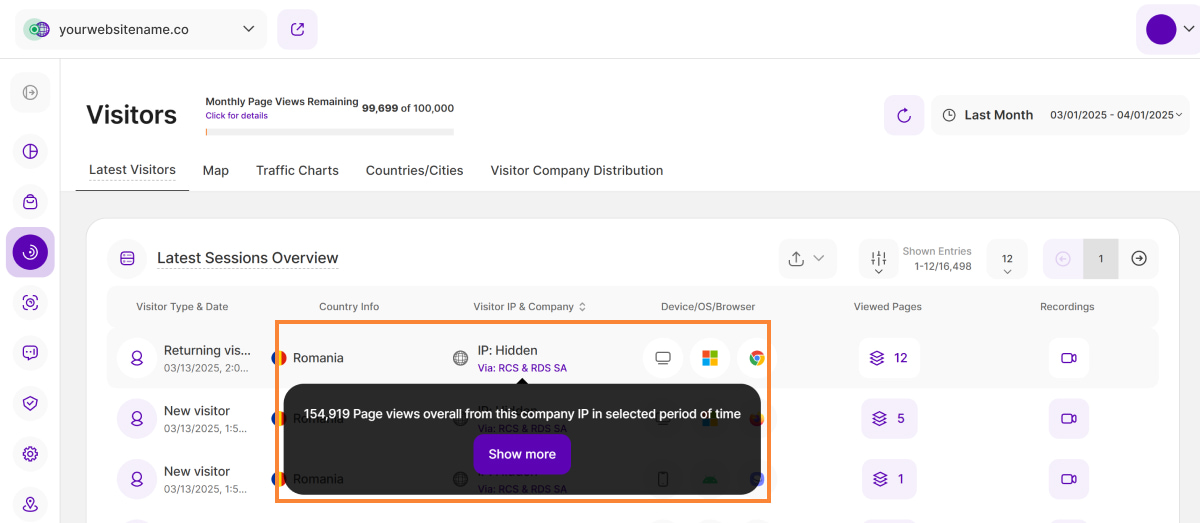
- Hovering over the Company Name or Carrier Network will show a tooltip saying "X Page views overall from this company IP in selected period of time". Clicking "Show More" will lead you to the Visitor Company Distribution tab with more information about the Companies or Carrier Networks via which your website was visited.
- Make sure to select the desired period so that the data reflects what you want to see. You can use the date picker in the top right to change the dates.
- The "Show More" button at the bottom has been removed, and pagination has been added to the top right of the report block for easier navigation.
Reveal Who's Navigating Your Pages
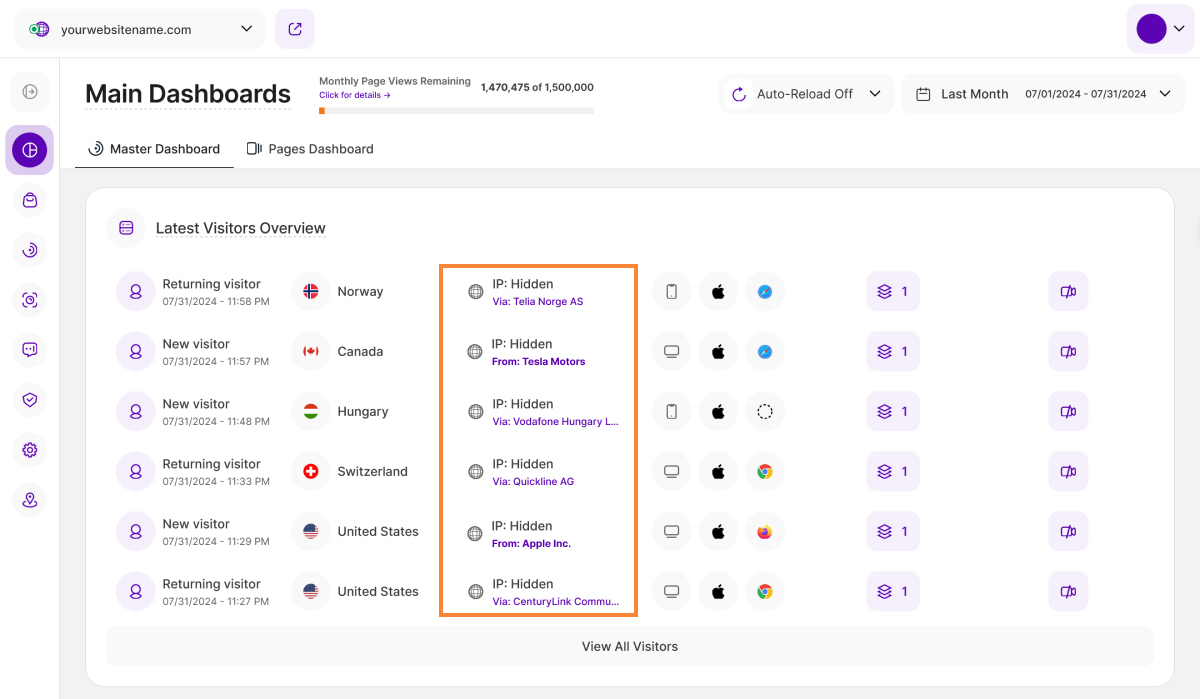
When a visitor accesses a website, their device's IP address is recorded, revealing valuable information about their origin. The Company Reveal feature capitalizes on this by analyzing the IP addresses and cross-referencing them with company-owned IP ranges. The feature will display the respective company's name if the visitor's IP address matches a known company-owned IP range. On the other hand, if the IP address does not correspond to a company-owned range, the feature will display the visitor's Internet Service Provider (ISP) or Carrier Network instead. If you are not subscribed to the required minimum pricing plan, you'll only see the text "Reveal Company Name", below the IP Address..
On the Master Dashboard, you'll get a quick overview of the six latest visitors to your website, which includes the following information:
- Status: This column provides information about whether this visitor is Returning, New, or Converting.
- Country/Visitor Location: In this column, you will see the flag of the country the visitor is visiting from. If you move your cursor over the flag, the name of the country will appear. Directly on the right side of the flag, you will find a little "location“-icon, that will forward you to the map view in which you see even more information about the exact geo-location of that visitor.
- Visitor IP & Company: The IP address is a unique string of numbers separated by full stops that identify each computer using the Internet Protocol to communicate over a network. If you are subscribed to the required minimum pricing plan, you'll have access to the Company Reveal feature wherein it examines the visitor IP addresses, cross-references them with company-owned IP ranges, and shows the company name if a match is found; otherwise, it displays the ISP/Carrier Network only.
- Devices: Here you can see what device (mobile, tablet, desktop), operating system (OS, i.e. Windows, Android, iOS, etc.), and browser (i.e. Chrome, Safari, Internet Explorer, Firefox, etc.) was used by your visitor. Move your mouse to the different icons to see hovers with more information.
- Visited Pages: If you want to know which pages of your website this visitor has visited during his session. It shows the name of the page, the website URL and the date and time of the visit. If this visitor has visited more than 1 page during his session, you will see the most recent visit to the oldest. Clicking it will provide you with even more information about the user journey of this visitor in its "Visitor's history" (session dates, pages, visitor details, referrer, recording details, and an option to view the recording. Note that accessibility to information would depend on the selected Data Privacy Mode. Check your settings within the data privacy center for more details.
- Visitor Recording (if available).
At the bottom of the tile, you'll find an option to View All Visitors. Clicking on this button will take you to the Latest Visitors tab under the Visitors module, where you can access a comprehensive list of all visitors, sorted from the most recent to the oldest entries.
Hint: It displays the same information as the Master Dashboard, but this report block is dependent on the selected time period. The displayed data here can be filtered or downloaded as .CSV or .XLSX.
Visitor Company Distribution
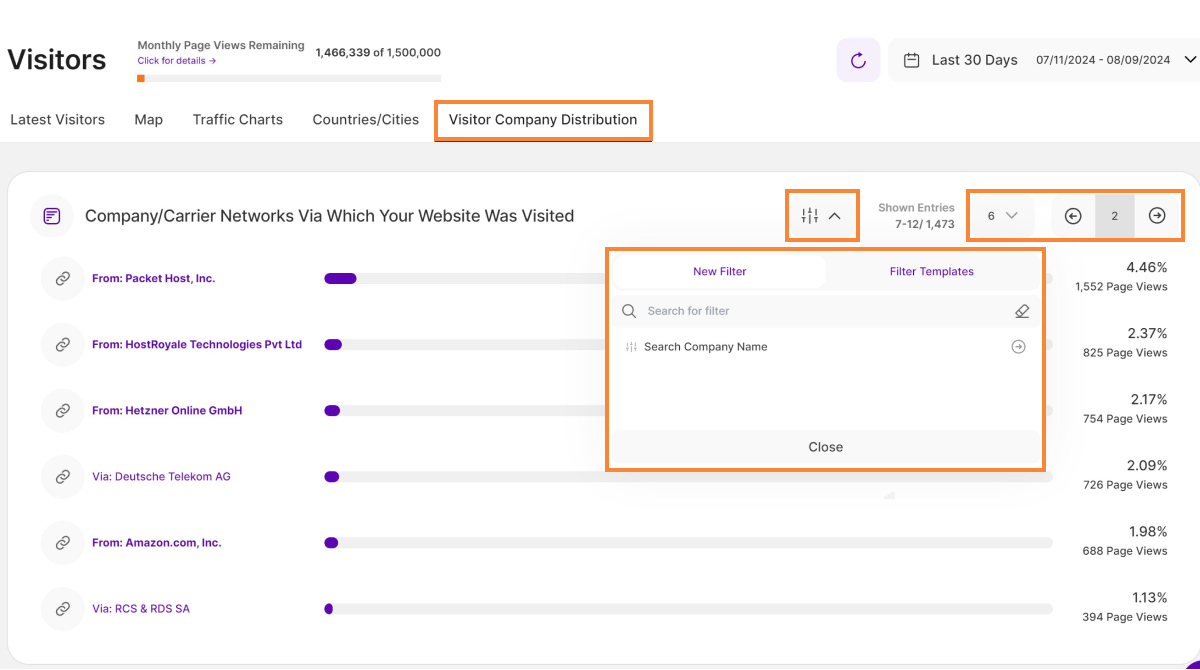
On the Visitors tile, in addition to displaying the IP addresses, company names, or network providers of the visitors who viewed your website, there is a new tab called Visitor Company Distribution. As part of the Company Reveal feature, this tab provides valuable statistics and insights into the companies or carrier networks that contribute the most to the overall traffic on your website. The tab presents this information in the form of a table with bars representing each company or carrier network.
Here's what you can find in this view:
- Company / Carrier Network: Each bar in the table represents a specific company or carrier network that has been identified as the source of website visits.
- Percentage: The percentage shown next to each bar indicates the proportion of total website sessions attributed to that particular company or carrier network. This helps you understand the relative contribution of each entity to your overall web traffic.
- Total Number of Page Views: Below the percentage, the total number of page views attributed to each company or carrier network is displayed. This provides a concrete figure indicating how page views your website received from each entity.
By default, the table shows the top 12 companies or carrier networks. These are likely the most significant contributors to your website's traffic. Understanding this distribution can be helpful in assessing the effectiveness of your marketing efforts, identifying potential business partners or customers, and gaining insights into the geographical reach of your website's audience.
With this information at your disposal, you can make informed decisions about your website's content, marketing strategies, and partnerships to further optimize and enhance its performance.
Important Notes:
- You'll find the filter icon on the top right side of the report block, where you can use the "Search Company Name" filter option to look up a specific company.
- Adjust the number of shown entries by clicking the dropdown next to Shown Entries to manage the number of entries shown at once. The options are available in increments of six, ranging from 6 to 48. It also displays the number of entries shown versus the total number of entries.
- Pagination has been added to the top right of the report block for easier navigation.